No templates. No page builders. Just clean code.
A complete website for Atlantic Canada's leading plastic surgery practice. Every component custom-coded, every interaction intentional.
The first impression. Video background, transparent nav, scroll prompt.
Full-viewport video with adaptive quality. Detects your device speed and serves the right file size.
// Check device capability
const conn = navigator.connection;
const isFast = conn?.downlink > 5;
const isBig = window.innerWidth > 1200;
// Pick the right video
if (isMobile) src = 'hero-mobile.mp4'; // 495KB
else if (isFast && isBig) src = 'hero-1920.mp4'; // 4.4MB
else src = 'hero-1280.mp4'; // 2MB
We check how fast your internet is and how big your screen is. Fast connection + big screen = high quality video. Slow or mobile = smaller file that loads quick. You never wait for a video that's bigger than you need.
<video poster="hero-poster.webp">
<source src="hero.mp4">
</video>
/* Poster shows immediately while video loads */
The poster image appears instantly. The video loads behind it. Once ready, it plays seamlessly. No blank screen, no loading spinner, no jarring transition.
Transparent over video, becomes solid when you scroll. Dropdowns for procedure categories.
window.addEventListener('scroll', () => {
nav.classList.toggle('nav--scrolled', scrollY > 100);
});
.nav { background: transparent; }
.nav--scrolled {
background: rgba(10,10,10,0.98);
backdrop-filter: blur(10px);
}
When you scroll past 100 pixels, we add a class. That class changes the nav from see-through to solid with a blur effect. CSS handles the smooth fade. Simple.
Animated hint that tells visitors there's more below. Disappears after first scroll.
window.addEventListener('scroll', () => {
prompt.classList.add('is-hidden');
}, { once: true });
/* once: true = runs only one time, then removes itself */
The scroll prompt's job is to say "hey, scroll down." Once you scroll, it did its job. It fades out and the listener removes itself. No wasted resources.
The design tokens. Every color, font, and spacing value defined once, used everywhere.
Dark, premium feel with gold accents. High contrast for accessibility.
:root {
--color-bg: #050505;
--color-accent: #D4AF37;
--color-white: #ffffff;
}
/* Used everywhere */
.btn { background: var(--color-accent); }
.title { color: var(--color-white); }
We define colors once at the top. Then we use those names everywhere. Want to change the gold? Change it in one place, updates everywhere. No find-and-replace nightmares.
Cormorant Garamond for elegance, Montserrat for readability.
<link rel="preconnect" href="fonts.googleapis.com">
<link href="...Cormorant+Garamond:wght@400;600&display=swap">
:root {
--font-display: 'Cormorant Garamond', serif;
--font-body: 'Montserrat', sans-serif;
}
We use Google Fonts with "display=swap" - this means text shows immediately in a fallback font, then swaps when the fancy font loads. No invisible text while waiting.
Consistent pattern: gold eyebrow, display heading, body lead text.
Board-certified expertise in transformative surgical procedures.
.section__heading {
font-size: clamp(1.75rem, 4vw, 2.5rem);
}
/* clamp(minimum, preferred, maximum)
- Never smaller than 1.75rem
- Scales with viewport (4vw)
- Never larger than 2.5rem */
clamp() is magic. The heading grows and shrinks with screen size automatically. No media queries needed. It picks the best size between your min and max.
Interactive elements. Consistent styling, clear hover states, accessible focus rings.
Four styles for different contexts: primary, outline, accent, gold outline.
.btn {
/* Base styles for ALL buttons */
padding: var(--space-3) var(--space-6);
border-radius: var(--radius-sm);
transition: all 0.2s;
}
.btn--accent {
/* Only what's different */
background: var(--color-accent);
color: #000;
}
The base .btn class has all the shared stuff (padding, corners, transitions). Modifiers like --accent only add what's different (colors). Less repeated code, easier to maintain.
Dark theme inputs with gold focus ring. Consistent across contact forms and filters.
input:focus {
outline: none;
border-color: var(--color-accent);
box-shadow: 0 0 0 3px rgba(212,175,55,0.1);
}
/* Gold border + subtle glow = clear focus indicator */
When you click into a field, it gets a gold border and a soft glow. This isn't just pretty - it's accessibility. People who navigate by keyboard need to see where they are.
Reusable building blocks. Services, team members, products, testimonials.
Three card types for different content: services, team, products.
Medical-grade products
Surgeon
$182
.card {
background: var(--color-dark-elevated);
border: 1px solid var(--color-border);
border-radius: var(--radius-sm);
overflow: hidden;
transition: border-color 0.2s;
}
.card:hover {
border-color: rgba(212,175,55,0.4);
}
All cards share the same base: dark background, subtle border, rounded corners. On hover, the border gets a gold tint. This consistency makes the site feel cohesive.
Click a team card, bio loads without page refresh. Saves bandwidth, feels instant.
card.addEventListener('click', async () => {
const data = await fetch(`/api/team/${id}`).then(r => r.json());
modal.querySelector('.name').textContent = data.name;
modal.querySelector('.bio').innerHTML = data.bio;
modal.classList.add('is-open');
});
We don't load everyone's full bio upfront - that's wasteful. When you click, we fetch just that person's info. Modal slides in with the data. Fast and efficient.
Patient reviews with source attribution. Links to RateMDs for credibility.
Open/closed indicator calculated from business hours in real-time.
const now = new Date();
const day = now.getDay(); // 0=Sun, 1=Mon...
const hour = now.getHours();
const isOpen = (day >= 1 && day <= 5) // Mon-Fri
&& (hour >= 9 && hour < 17); // 9am-5pm
We grab the current day and hour from your device. If it's Monday-Friday between 9-5, show "Open." Otherwise, "Closed." Updates automatically - no manual toggling.
The special stuff. Body Explorer, Finance Calculator, Expandable Policies.
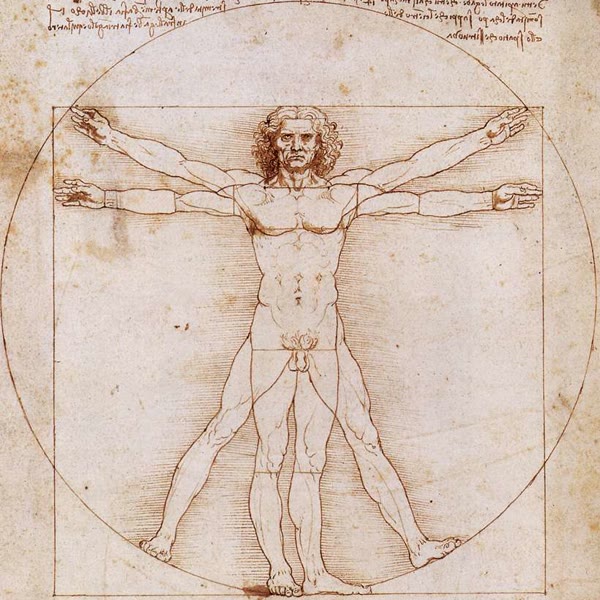
Click body regions to discover procedures. The Vitruvian Man image is from Wikipedia (public domain), modified with CSS filters to match our gold theme.
<svg viewBox="0 0 600 600">
<polygon
class="be-region"
data-region="face"
points="297,119 281,117 277,139...">
</polygon>
</svg>
/* Hand-traced coordinates over the image */
We drew invisible shapes over the body image. Each shape has coordinates (like connect-the-dots). When you click inside those dots, we know which region you picked. It's like an image map but fancier.
const regions = { face: {...}, chest: {...} };
function showRegion(key) {
gridPanel.style.display = 'none';
regionPanel.style.display = 'block';
title.textContent = regions[key].title;
}
function showGrid() {
regionPanel.style.display = 'none';
gridPanel.style.display = 'block';
}
Two panels: the grid view and the detail view. Click a region, we hide grid and show detail. Click back, we swap them again. Just show/hide - no framework, no complexity.
Real-time payment estimates. Removes the "can I afford this?" question before consultation.
const rate = 0.099 / 12; // 9.9% APR monthly
const payment = (amount * rate * Math.pow(1 + rate, term))
/ (Math.pow(1 + rate, term) - 1);
// This is the standard loan payment formula
// Used by banks, Beautifi, everyone
It's the same math your bank uses. Plug in the amount and months, get the monthly payment. We use Beautifi's typical 9.9% rate. Move the slider, number updates instantly.
Click to expand appointment guidelines, cancellation policies, etc.
const policies = {
appointments: { title: '...', body: '...' },
cancellations: { title: '...', body: '...' }
};
btn.onclick = () => {
list.style.display = 'none';
expand.style.display = 'block';
title.textContent = policies[btn.dataset.policy].title;
};
Policy content lives in a JavaScript object. Click a button, we look up the content by its key, hide the list, show the detail panel. Click back, reverse it. Clean and simple.

Everyone can use this site. Light/dark mode, font scaling, high contrast, reduced motion.
Floating button opens a panel with display options. Preferences saved to localStorage.
const prefs = { lightMode: false, fontSize: 16 };
function save() {
localStorage.setItem('a11y_prefs', JSON.stringify(prefs));
}
function load() {
const stored = localStorage.getItem('a11y_prefs');
if (stored) Object.assign(prefs, JSON.parse(stored));
}
When you change a setting, we save it to your browser. Next visit, we load it back. Your preferences stick around. No account needed, no cookies to accept.
function apply() {
document.body.classList.toggle('a11y-light-mode', prefs.lightMode);
document.documentElement.style.fontSize = prefs.fontSize + 'px';
}
/* One function applies all settings at once */
Toggle light mode? Add a class to body. Change font size? Set it on the root element. All our sizes use "rem" units, so they scale from that one setting.
Full-screen tile navigation. Big touch targets, smooth animations.
function openMenu() {
document.body.style.overflow = 'hidden';
menu.classList.add('is-open');
}
function closeMenu() {
document.body.style.overflow = '';
menu.classList.remove('is-open');
}
When menu opens, we stop the page behind it from scrolling. Otherwise you'd scroll the page while trying to tap menu items. Annoying. We prevent that.
Built to rank. Semantic HTML, structured data, fast loads, individual pages for every staff member.
JSON-LD markup tells Google exactly what this business is. Shows rich results in search.
<script type="application/ld+json">
{
"@type": "MedicalBusiness",
"name": "Dr. D. Brent Howley",
"medicalSpecialty": "PlasticSurgery",
"address": { "streetAddress": "585 Mapleton Rd" },
"founder": {
"@type": "Physician",
"name": "Dr. D. Brent Howley",
"medicalSpecialty": "PlasticSurgery",
"description": "Board-certified plastic surgeon, FRCSC"
}
}
</script>
We tell Google "this is a medical business, here's the address, here's the doctor." Google uses this for rich snippets - the nice cards with hours, ratings, and contact info right in search results.
Every page has unique title, description, and social sharing tags.
<title><?php echo $pageTitle; ?></title>
<meta name="description" content="<?php echo $pageDescription; ?>">
<!-- Open Graph for social sharing -->
<meta property="og:title" content="...">
<meta property="og:image" content="...">
<!-- Twitter Card -->
<meta name="twitter:card" content="summary_large_image">
Each page sets its own title and description. When someone shares on Facebook or Twitter, it shows a nice preview card with the right image and text. Not a generic "Home" title.
Every team member has their own URL. Ranks for "Dr Howley Moncton" searches.
// 10 individual staff pages
/dr-howley.php
/tania-theriault.php
/katherine-caissie.php
...
// Each with unique schema
"@type": "Physician",
"name": "Dr. D. Brent Howley",
"medicalSpecialty": "PlasticSurgery"
When someone Googles "Tania Theriault Moncton aesthetics" - they find her page directly. Not buried in a team section. Each staff member is a landing page for their name searches.
XML sitemap for crawlers. Robots.txt for access control.
<urlset>
<url>
<loc>https://drhowley.com/</loc>
<priority>1.0</priority>
</url>
<url>
<loc>https://drhowley.com/procedures.php</loc>
<priority>0.9</priority>
</url>
<!-- 30+ pages -->
</urlset>
We give Google a map of every page on the site. Priority tells them which pages matter most. They don't have to guess - we hand them the blueprint.
Google ranks fast sites higher. We optimized everything.
# Compressed 210 photos
# 1.3GB JPG → 32MB WebP (97.5% smaller)
ffmpeg -i "photo.jpg" \
-vf "scale='min(1920,iw)':-1" \
-quality 80 \
"photo.webp"
We crushed 1.3 gigabytes of photos down to 32 megabytes. Same quality, 97% smaller files. Page loads fast, Google's happy, visitors don't wait.
Leave the homepage idle for 100 seconds. The website becomes a screensaver - cycling through staff photos, video clips, and key content in a hands-off display. Saves your screen, shows off the practice. Works on any display - reception desk, waiting room TV, lobby screen.
Not just "show a video" - it's a complete digital signage system built into the website.
const contentSlides = [
// Staff cards with photo, name, title
{ type: 'staff',
name: 'Dr. D. Brent Howley',
title: 'Plastic Surgeon',
image: 'dr-howley-portrait.webp' },
{ type: 'staff',
name: 'Tania Thériault',
title: 'Aesthetic Nurse Specialist',
image: 'staff-portrait-tania.webp' },
// Video segments
{ type: 'video' },
// More staff...
];
// Alternates: staff → staff → video → staff...
The slideshow alternates between staff member cards and video clips. Each staff slide shows their photo (with blurred background), name, and title. Video slides play the hero footage. It cycles through the whole team, introducing patients to the staff while they wait.
Detects inactivity, saves scroll position, restores everything when you return.
function enterIdleMode() {
savedScrollPosition = window.scrollY;
document.body.classList.add('idle-mode');
window.scrollTo({ top: 0, behavior: 'smooth' });
startSlideshow();
}
function exitIdleMode() {
stopSlideshow();
document.body.classList.remove('idle-mode');
// Restore where they were
window.scrollTo({ top: savedScrollPosition });
resetIdleTimer();
}
// Any interaction exits
['mousemove', 'touchstart', 'scroll', 'keydown']
.forEach(e => window.addEventListener(e, exitIdleMode));
When idle mode starts: we save where you scrolled to, scroll to top, launch the slideshow. When you move your mouse or touch the screen: slideshow stops, you're back exactly where you were. No lost progress, no confusion.
Progress bar, blurred backgrounds, smooth transitions between slides.
// Blurred background from staff photo
.slideshow-bg {
background-image: url(staff-photo.webp);
filter: blur(30px) brightness(0.4);
transform: scale(1.1);
}
// Progress bar shows time remaining
.slideshow-progress-bar {
background: #D4AF37;
width: 0%;
transition: width 0.1s linear;
}
// Fade between slides
@keyframes slideFadeIn {
from { opacity: 0; transform: translateY(20px); }
to { opacity: 1; transform: translateY(0); }
}
Each staff slide has their photo blurred and darkened as a background - looks premium. A gold progress bar at the bottom shows how long until the next slide. Slides fade in/out smoothly, not abruptly. It looks like professional digital signage software, but it's just the website.
Beautiful code deserves beautiful content.
We build websites from scratch. No templates, no page builders. Just clean code that you own.